<?xml version="1.0" encoding="utf-8"?><feed xmlns="http://www.w3.org/2005/Atom" ><generator uri="https://jekyllrb.com/" version="3.10.0">Jekyll</generator><link href="https://timkraeuter.com/feed.xml" rel="self" type="application/atom+xml" /><link href="https://timkraeuter.com/" rel="alternate" type="text/html" /><updated>2026-03-01T15:03:25+00:00</updated><id>https://timkraeuter.com/feed.xml</id><title type="html">Tim Kräuter</title><subtitle>The homepage of a german software engineer, who lives in Norway.</subtitle><entry><title type="html">BPMN Analyzer 2.0: Instantaneous BPMN control-flow analysis and error resolution :fire:</title><link href="https://timkraeuter.com/rust-bpmn-analyzer/" rel="alternate" type="text/html" title="BPMN Analyzer 2.0: Instantaneous BPMN control-flow analysis and error resolution :fire:" /><published>2024-03-18T18:00:00+00:00</published><updated>2024-03-18T18:00:00+00:00</updated><id>https://timkraeuter.com/rust-bpmn-analyzer</id><content type="html" xml:base="https://timkraeuter.com/rust-bpmn-analyzer/"><![CDATA[<p>The <strong>BPMN Analyzer 2.0</strong> is a tool to analyze BPMN process models to find, display, and fix control-flow errors already during modeling.
Unlike my previous <a href="https://timkraeuter.com/bpmn-analyzer/">BPMN Analyzer</a>, this tool is written in Rust and uses a pragmatic encoding of BPMN semantics for optimal performance regarding control-flow analysis.
A demo version of the analyzer is hosted <a href="https://timkraeuter.com/bpmn-analyzer-js/">online</a> and the source code is open-source (<a href="https://github.com/timKraeuter/bpmn-analyzer-js">front-end</a>, <a href="https://github.com/timKraeuter/rust_bpmn_analyzer">back-end</a>).
My <a href="https://raw.githubusercontent.com/timKraeuter/timKraeuter.github.io/master/assets/publications/BPMN_Analyzer_2.0.pdf">research paper</a> about the analyzer is published at the Demonstrations &amp; Resources Forum co-located with the 22nd International Conference on Business Process Management (BPM 2024).
In the following YouTube video I demo the BPMN Analyzer 2.0:</p>

<div style="text-align:center">
<iframe width="560" height="315" src="https://www.youtube.com/embed/Nv2W-hXNZYA" title="BPMN Analyzer 2.0 Demonstration" frameborder="0" allow="accelerometer; autoplay; clipboard-write; encrypted-media; gyroscope; picture-in-picture" allowfullscreen=""></iframe>
</div>

<p>The BPMN Analyzer 2.0 has three <em>ambitious</em> goals:</p>

<ol>
  <li><strong>Instantaneous analysis</strong> (&lt; 500ms) of realistic BPMN models.</li>
  <li><strong>Understandability</strong> of the found control-flow errors (clearly showing their cause).</li>
  <li><strong>Automatic quick-fixes</strong> for the most common control-flow errors.</li>
</ol>

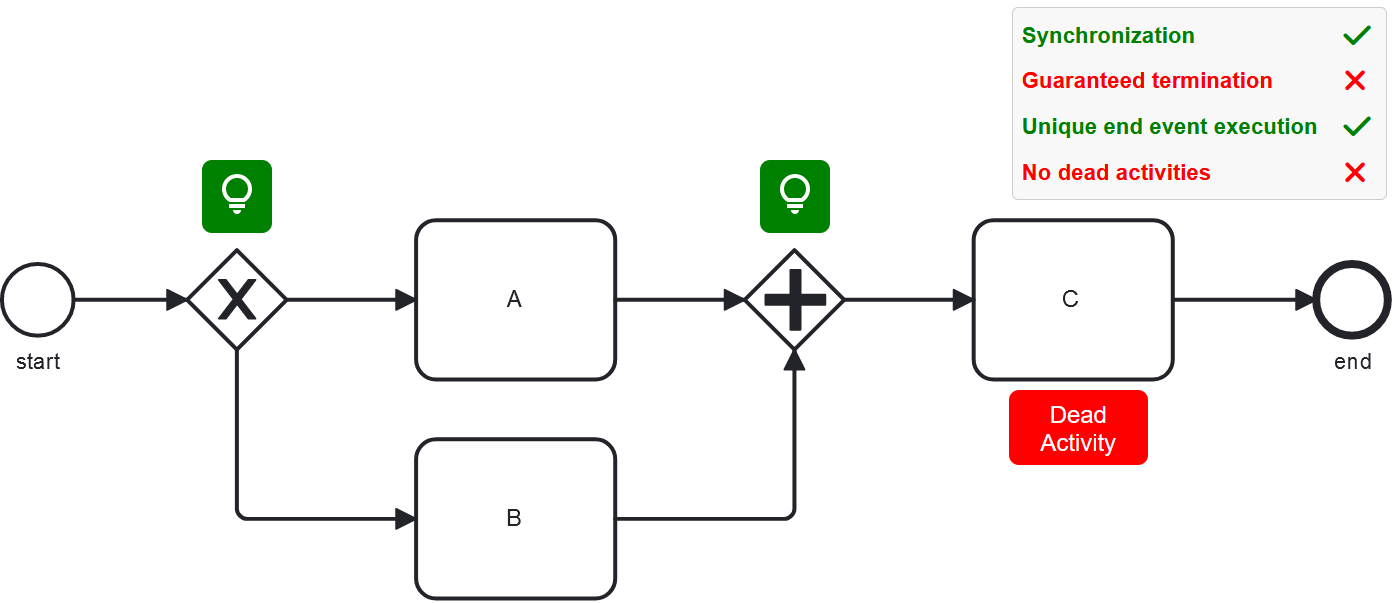
<p>The analyzer can easily be integrated into BPMN modeling tools like <a href="https://bpmn.io/">bpmn.io</a> as in our <a href="https://timkraeuter.com/bpmn-analyzer-js/">demo</a> to provide instant feedback during modeling.
In the screenshot below, one can see control-flow errors highlighted in red and quick-fix suggestions in green.</p>

<p><a href="https://timkraeuter.com/bpmn-analyzer-js/"><img src="https://raw.githubusercontent.com/timKraeuter/timKraeuter.github.io/master/assets/images/rustBPMNAnalyzer/modeling.png" alt="Modeling with the BPMN Analyzer 2.0 enabled" /></a></p>

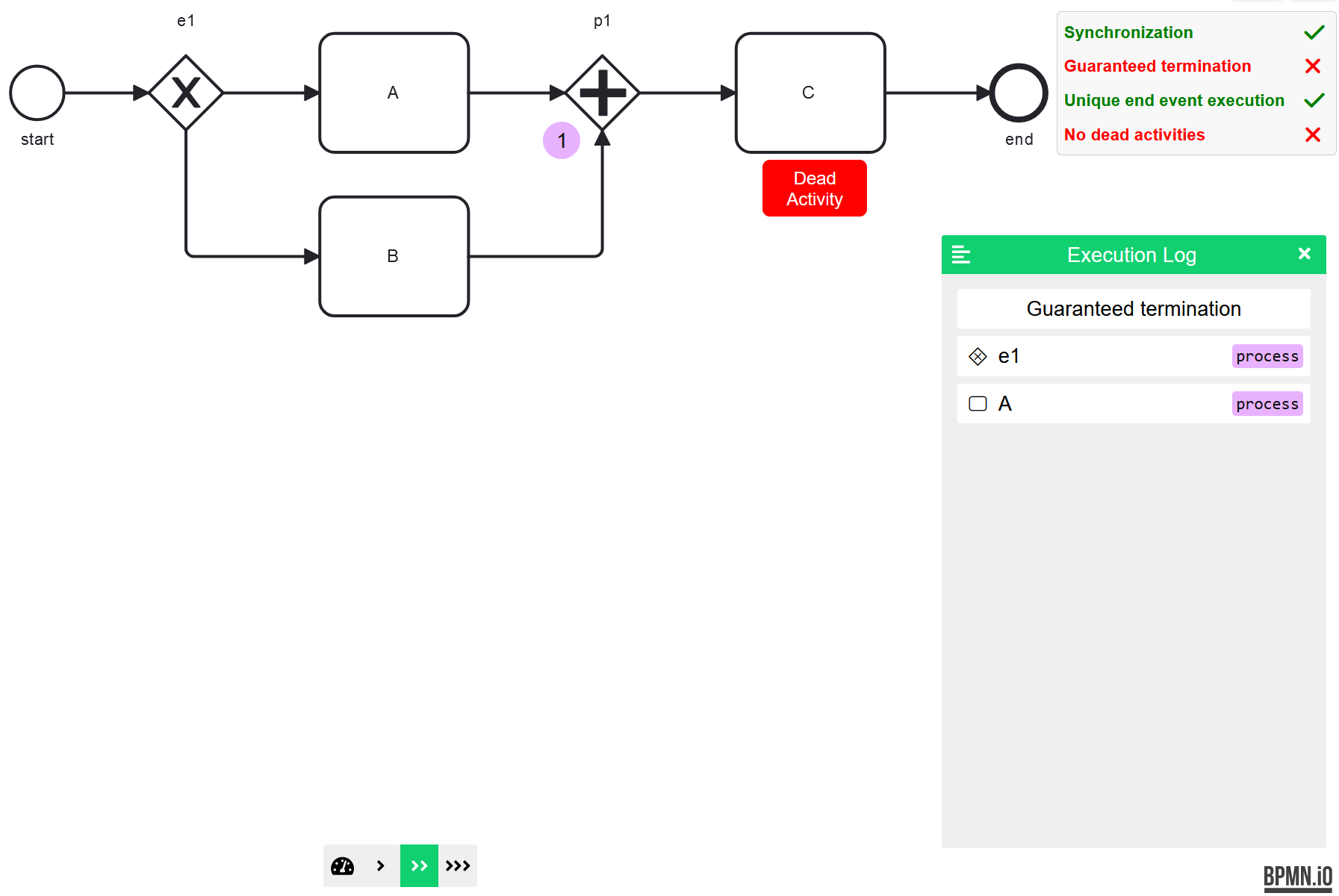
<p>To understand control-flow errors, the analyzer can visualize the possible execution that led to the error.
The following screenshot shows how the analyzer visualizes the execution leading to a process getting stuck.</p>

<p><a href="https://timkraeuter.com/bpmn-analyzer-js/"><img src="https://raw.githubusercontent.com/timKraeuter/timKraeuter.github.io/master/assets/images/rustBPMNAnalyzer/counter-example.png" alt="Error example in the BPMN Analyzer 2.0" /></a></p>]]></content><author><name>timKraeuter</name></author><category term="project" /><category term="BPMN" /><category term="control-flow analysis" /><category term="quick fix" /><summary type="html"><![CDATA[This is a tool to analyze BPMN process models to find, display, and fix control-flow errors already during modeling.]]></summary><media:thumbnail xmlns:media="http://search.yahoo.com/mrss/" url="https://raw.githubusercontent.com/timKraeuter/timKraeuter.github.io/master/assets/images/bpmnAnalyzer/icon.svg" /><media:content medium="image" url="https://raw.githubusercontent.com/timKraeuter/timKraeuter.github.io/master/assets/images/bpmnAnalyzer/icon.svg" xmlns:media="http://search.yahoo.com/mrss/" /></entry><entry><title type="html">Visual Debugging in IntelliJ :beetle:</title><link href="https://timkraeuter.com/visual-debugger/" rel="alternate" type="text/html" title="Visual Debugging in IntelliJ :beetle:" /><published>2023-12-07T10:00:00+00:00</published><updated>2023-12-07T10:00:00+00:00</updated><id>https://timkraeuter.com/visual-debugger</id><content type="html" xml:base="https://timkraeuter.com/visual-debugger/"><![CDATA[<p>A software developer spends a large amount of their time validating and debugging software.
Traditionally, debuggers depict information in a text-based format.
However, in my opinion, when there are many connected objects, a graphical representation during debugging is easier to comprehend.
Thus, I implemented an <a href="https://github.com/timKraeuter/VisualDebugger">open-source</a> plugin for IntelliJ IDEA, which visualizes the program state as an object diagram during debugging.
The following YouTube video demonstrates the use of the Visual Debugger.</p>

<div style="text-align:center">
<iframe width="560" height="315" src="https://www.youtube.com/embed/LsAMTnLxWJw" title="Visual Debugger 2.0 Demonstration" frameborder="0" allow="accelerometer; autoplay; clipboard-write; encrypted-media; gyroscope; picture-in-picture" allowfullscreen=""></iframe>
</div>

<p>I published two research papers about the Visual Debugger.
The first paper describes the Visual Debugger and its motivation (<a href="https://raw.githubusercontent.com/timKraeuter/timKraeuter.github.io/master/assets/publications/The_Visual_Debugger_Tool.pdf">preprint</a>).
It is <a href="https://doi.org/10.1109/ICSME55016.2022.00066">published</a> at the <strong>International Conference on Software Maintenance and Evolution (ICSME) 2022</strong>.
In addition, I describe the new features of the Visual Debugger in the second <a href="https://raw.githubusercontent.com/timKraeuter/timKraeuter.github.io/master/assets/publications/The_Visual_Debugger_Past_Present_and_Future.pdf">paper</a>, which is <a href="https://doi.org/10.1145/3643796.3648443">published</a> at the <strong>International Conference on Software Engineering (ICSE) 2024</strong>.</p>

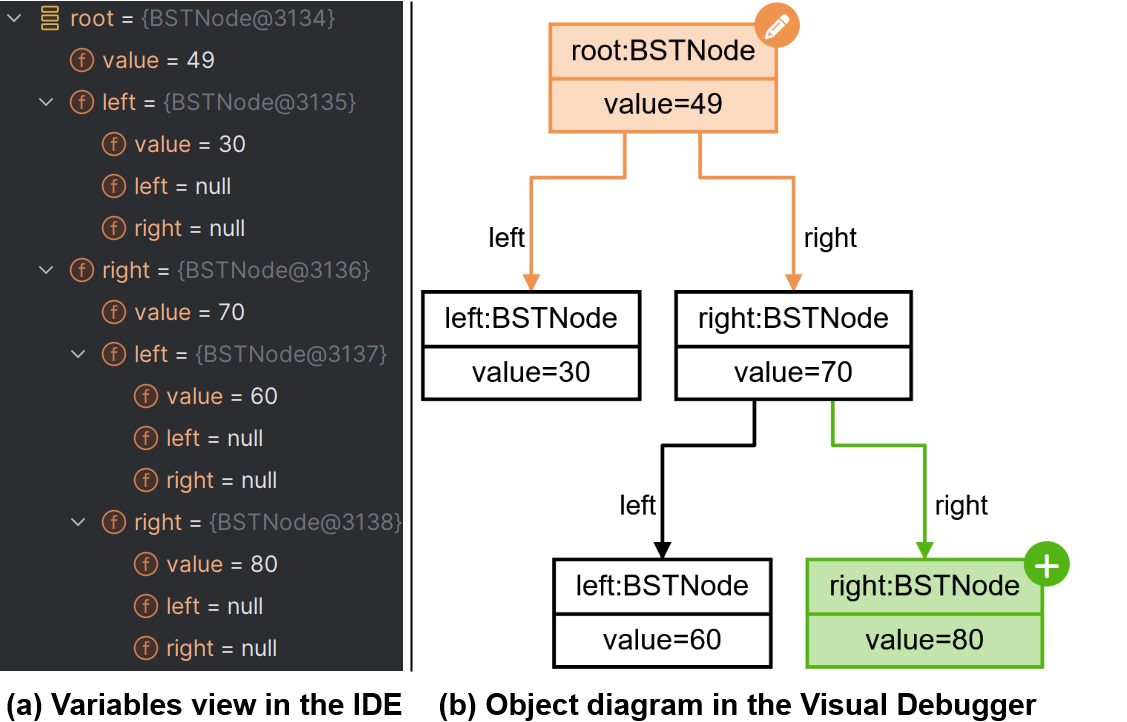
<p>In many scenarios, graphical representations such as object diagrams are more understandable than textual representations when representing the state of an object-oriented system.
You can see the different representations in the following screenshot of a binary search tree, which includes an object diagram view for the stack frame variables on the right.</p>

<p><img src="https://raw.githubusercontent.com/timKraeuter/timKraeuter.github.io/master/assets/images/visualDebugger/variables.png" alt="Screenshot embedded browser" /></p>

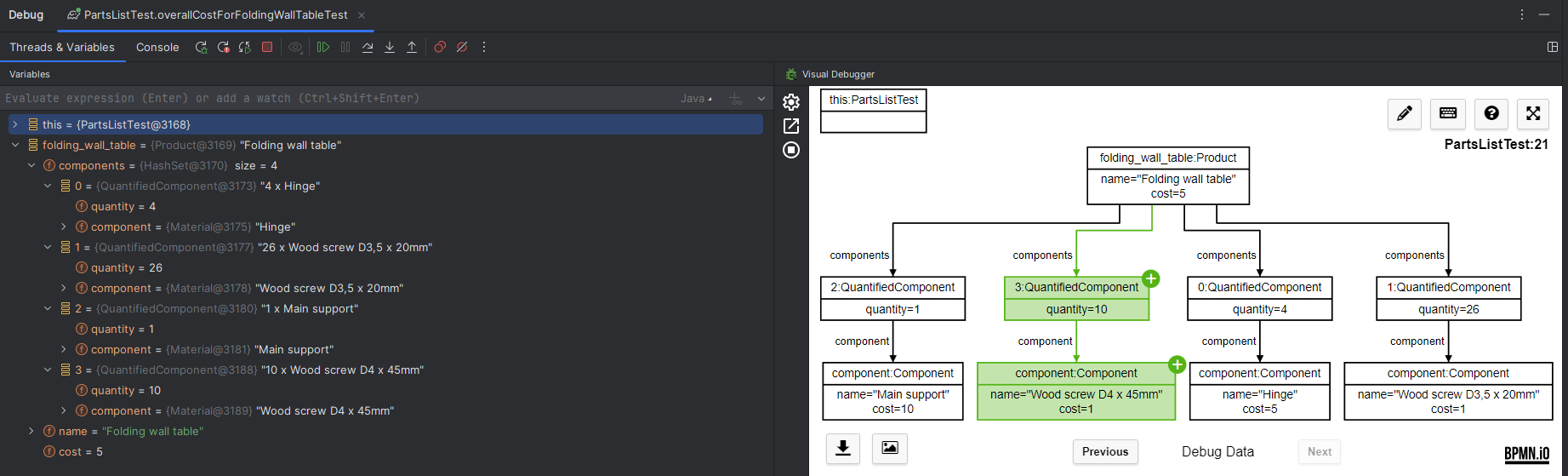
<p>The Visual Debugger highlights changes using colors and keeps a debug history such that users can see previous object diagrams.
The Visualization happens either in an external browser or integrated into the IDE using an embedded browser:</p>

<p><img src="https://raw.githubusercontent.com/timKraeuter/timKraeuter.github.io/master/assets/images/visualDebugger/ide-screenshot.png" alt="Screenshot embedded browser" /></p>

<p>The browser will connect via WebSocket to the plugin, such that it will receive live updates when the debugger variables changed due to IDEA input.
The UI is <a href="https://github.com/timKraeuter/object-diagram-js/tree/master/debugger">open-source</a> and not tied to IntelliJ IDEA and can be used as a debugging view for other IDE’s and programming languages.
This is possible due to the architecture of the Visual Debugger which separates obtaining stack frame variables from the visualization:</p>

<div style="text-align:center">
    <img src="https://raw.githubusercontent.com/timKraeuter/timKraeuter.github.io/master/assets/images/visualDebugger/architecture.svg" alt="Visual Debugger Architecture" />
</div>

<p>One can also export and then edit the object diagrams generated by the debugger afterward using my <a href="https://timkraeuter.com/object-diagram-js/">object diagram modeler</a>.</p>

<hr />

<p>For complex debugging scenarios, you can set the initial depth of visualization when using the Visual Debugger.
In addition, you can export the current visualization as an SVG file.</p>

<div style="text-align:center">
    <iframe frameborder="none" width="384px" height="319px" src="https://plugins.jetbrains.com/embeddable/card/16851" title="Visual Debugger JetBrains Plugin Card"></iframe>
</div>

<p>Check the plugin out <a href="https://plugins.jetbrains.com/plugin/16851-visual-debugger">here</a> if you are curious!</p>

<hr />

<div style="text-align:center">
    <iframe frameborder="none" width="245px" height="48px" src="https://plugins.jetbrains.com/embeddable/install/16851" title="Install Visual Debugger Plugin"></iframe>
</div>]]></content><author><name>timKraeuter</name></author><category term="project" /><category term="debugging" /><category term="visualization" /><category term="IntelliJ" /><summary type="html"><![CDATA[The Visual Debugger is a plugin for IntelliJ IDEA, which visualizes the program state as an object diagram during debugging.]]></summary><media:thumbnail xmlns:media="http://search.yahoo.com/mrss/" url="https://raw.githubusercontent.com/timKraeuter/timKraeuter.github.io/master/assets/images/visualDebugger/pluginIcon.png" /><media:content medium="image" url="https://raw.githubusercontent.com/timKraeuter/timKraeuter.github.io/master/assets/images/visualDebugger/pluginIcon.png" xmlns:media="http://search.yahoo.com/mrss/" /></entry><entry><title type="html">BPMN Analyzer: Formal analysis of BPMN process models :chart_with_upwards_trend:</title><link href="https://timkraeuter.com/bpmn-analyzer/" rel="alternate" type="text/html" title="BPMN Analyzer: Formal analysis of BPMN process models :chart_with_upwards_trend:" /><published>2023-03-16T10:45:00+00:00</published><updated>2023-03-16T10:45:00+00:00</updated><id>https://timkraeuter.com/bpmn-analyzer</id><content type="html" xml:base="https://timkraeuter.com/bpmn-analyzer/"><![CDATA[<p>The Business Process Modeling Notation (BPMN) is a widely used standard notation for defining intra- and inter-organizational workflows.
It is used heavily for process automation and orchestration in <a href="https://camunda.com/about/customers/">many businesses</a>.
Formalizing BPMN reduces the cost of business process automation by facilitating the detection of errors and optimization potentials in process models already during design time before the implementation starts.
The <a href="https://bpmn-analyzer.wittyrock-9d6a3c00.northeurope.azurecontainerapps.io">BPMN Analyzer</a> is an <a href="https://github.com/timKraeuter/Rewrite_Rule_Generation">open-source</a> tool to analyze BPMN process models formally.</p>

<div style="text-align:center">
<iframe width="560" height="315" src="https://www.youtube.com/embed/MxXbNUl6IjE" title="BPMN Analyzer Tool Demonstration" frameborder="0" allow="accelerometer; autoplay; clipboard-write; encrypted-media; gyroscope; picture-in-picture" allowfullscreen=""></iframe>
</div>

<p>The tool supports <a href="https://github.com/timKraeuter/Rewrite_Rule_Generation/wiki#feature-support-comparison">most BPMN constructs</a> used in practice and allows checking behavioral properties.
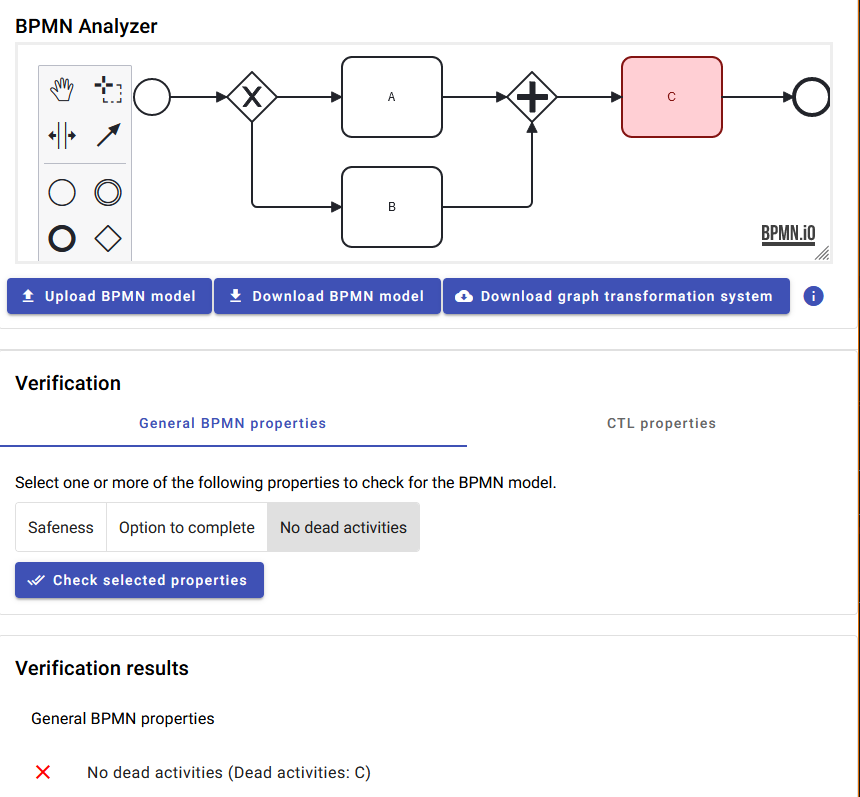
Especially, it can check if a BPMN model contains dead activities (activities which can never execute) or cannot terminate.
The following screenshot shows the detection of a dead activity in a BPMN model. The activity can never execute due to wrong gateway usage.</p>

<p><img src="https://raw.githubusercontent.com/timKraeuter/timKraeuter.github.io/master/assets/images/bpmnAnalyzer/screenshot.png" alt="Screenshot of the BPMN Analyzer tool detecting a dead activity" /></p>

<p>I published a <a href="https://doi.org/10.1007/978-3-031-36709-0_11">research paper</a> about the formalization used in the tool at the <strong>16th International Conference on Graph Transformation (ICGT 2023)</strong>.
The paper won the <strong><a href="https://raw.githubusercontent.com/timKraeuter/timKraeuter.github.io/master/assets/BestPaperICGT2023.pdf">★ Best Paper Award ★</a></strong>.
You can read the <a href="https://raw.githubusercontent.com/timKraeuter/timKraeuter.github.io/master/assets/publications/Formalization_and_analysis_of_BPMN_using_graph_transformation_systems.pdf">preprint</a> of the paper for free.</p>]]></content><author><name>timKraeuter</name></author><category term="project" /><category term="BPMN" /><category term="formalization" /><category term="model checking" /><summary type="html"><![CDATA[This is a tool to analyze BPMN process models to find bugs during design time before the implementation starts.]]></summary><media:thumbnail xmlns:media="http://search.yahoo.com/mrss/" url="https://raw.githubusercontent.com/timKraeuter/timKraeuter.github.io/master/assets/images/bpmnAnalyzer/icon.svg" /><media:content medium="image" url="https://raw.githubusercontent.com/timKraeuter/timKraeuter.github.io/master/assets/images/bpmnAnalyzer/icon.svg" xmlns:media="http://search.yahoo.com/mrss/" /></entry><entry><title type="html">Smart CoP: Privacy policy</title><link href="https://timkraeuter.com/SmartCoP-privacy/" rel="alternate" type="text/html" title="Smart CoP: Privacy policy" /><published>2021-10-29T14:30:00+00:00</published><updated>2021-10-29T14:30:00+00:00</updated><id>https://timkraeuter.com/SmartCoP-privacy</id><content type="html" xml:base="https://timkraeuter.com/SmartCoP-privacy/"><![CDATA[<p>We don’t store your data, period.</p>]]></content><author><name>timKraeuter</name></author><category term="project" /><category term="app" /><category term="privacy" /><summary type="html"><![CDATA[Privacy policy for the Smart CoP app.]]></summary><media:thumbnail xmlns:media="http://search.yahoo.com/mrss/" url="https://raw.githubusercontent.com/timKraeuter/timKraeuter.github.io/master/assets/images/autoD_icon_dark.png" /><media:content medium="image" url="https://raw.githubusercontent.com/timKraeuter/timKraeuter.github.io/master/assets/images/autoD_icon_dark.png" xmlns:media="http://search.yahoo.com/mrss/" /></entry><entry><title type="html">Smart CoP: Privacy policy</title><link href="https://timkraeuter.com/autoD-privacy/" rel="alternate" type="text/html" title="Smart CoP: Privacy policy" /><published>2021-10-29T14:30:00+00:00</published><updated>2021-10-29T14:30:00+00:00</updated><id>https://timkraeuter.com/autoD-privacy</id><content type="html" xml:base="https://timkraeuter.com/autoD-privacy/"><![CDATA[<p>We don’t store your data, period.</p>

<hr />

<div style="display:flex;width:100%;align-items:center;;margin-top:-18%;">
    <div style="flex:49.99%;padding:5px">
    <a href="https://play.google.com/store/apps/details?id=de.tk.autoD&amp;pcampaignid=pcampaignidMKT-Other-global-all-co-prtnr-py-PartBadge-Mar2515-1"><img alt="Get it on Google Play" src="https://raw.githubusercontent.com/timKraeuter/timKraeuter.github.io/master/assets/images/g-play.svg" /></a>
    </div>
    <div style="flex:49.99%;padding:5px">
    <a href="https://smartcoppwa.web.app"><img alt="Launch as Web App" src="https://raw.githubusercontent.com/timKraeuter/timKraeuter.github.io/master/assets/images/PWA-dark-en.svg" /></a>
    </div>
</div>]]></content><author><name>timKraeuter</name></author><category term="project" /><category term="app" /><category term="privacy" /><summary type="html"><![CDATA[Privacy policy for the Smart CoP app.]]></summary><media:thumbnail xmlns:media="http://search.yahoo.com/mrss/" url="https://raw.githubusercontent.com/timKraeuter/timKraeuter.github.io/master/assets/images/autoD_icon_dark.png" /><media:content medium="image" url="https://raw.githubusercontent.com/timKraeuter/timKraeuter.github.io/master/assets/images/autoD_icon_dark.png" xmlns:media="http://search.yahoo.com/mrss/" /></entry><entry><title type="html">Smart CoP: Kurzeinführung :muscle:</title><link href="https://timkraeuter.com/SmartCoP-tutorial-de/" rel="alternate" type="text/html" title="Smart CoP: Kurzeinführung :muscle:" /><published>2020-02-24T19:33:00+00:00</published><updated>2020-02-24T19:33:00+00:00</updated><id>https://timkraeuter.com/SmartCoP-tutorial-de</id><content type="html" xml:base="https://timkraeuter.com/SmartCoP-tutorial-de/"><![CDATA[<h1 id="übung-erstellen">Übung erstellen</h1>
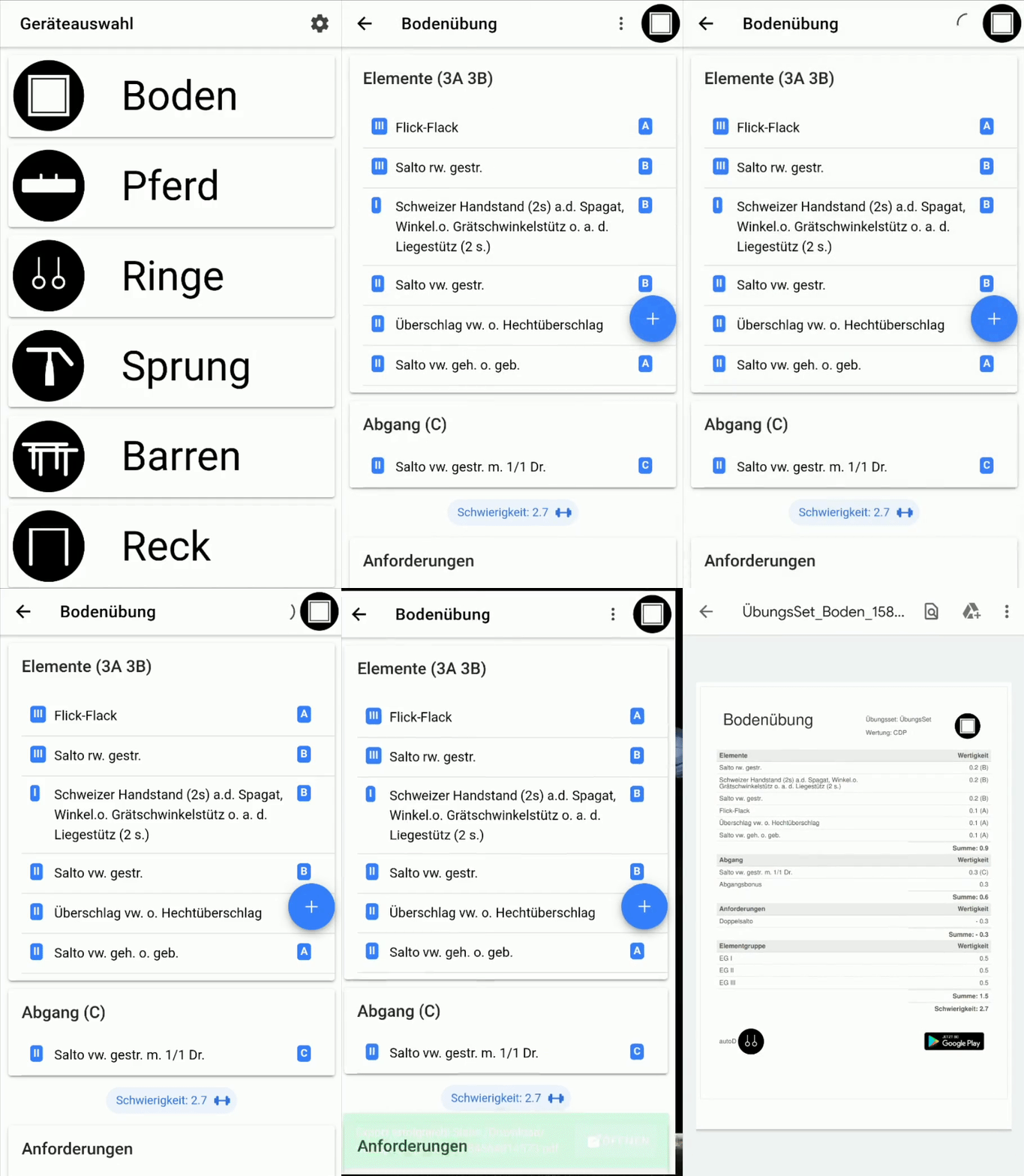
<p>Um den Ausgangswert einer Übung zu berechnen, müssen alle Elemente der Übung ausgewählt werden. Zusätzlich können die durch die Übung erfüllten Anforderungen selektiert werden.</p>
<h2 id="element-hinzufügen">Element hinzufügen</h2>
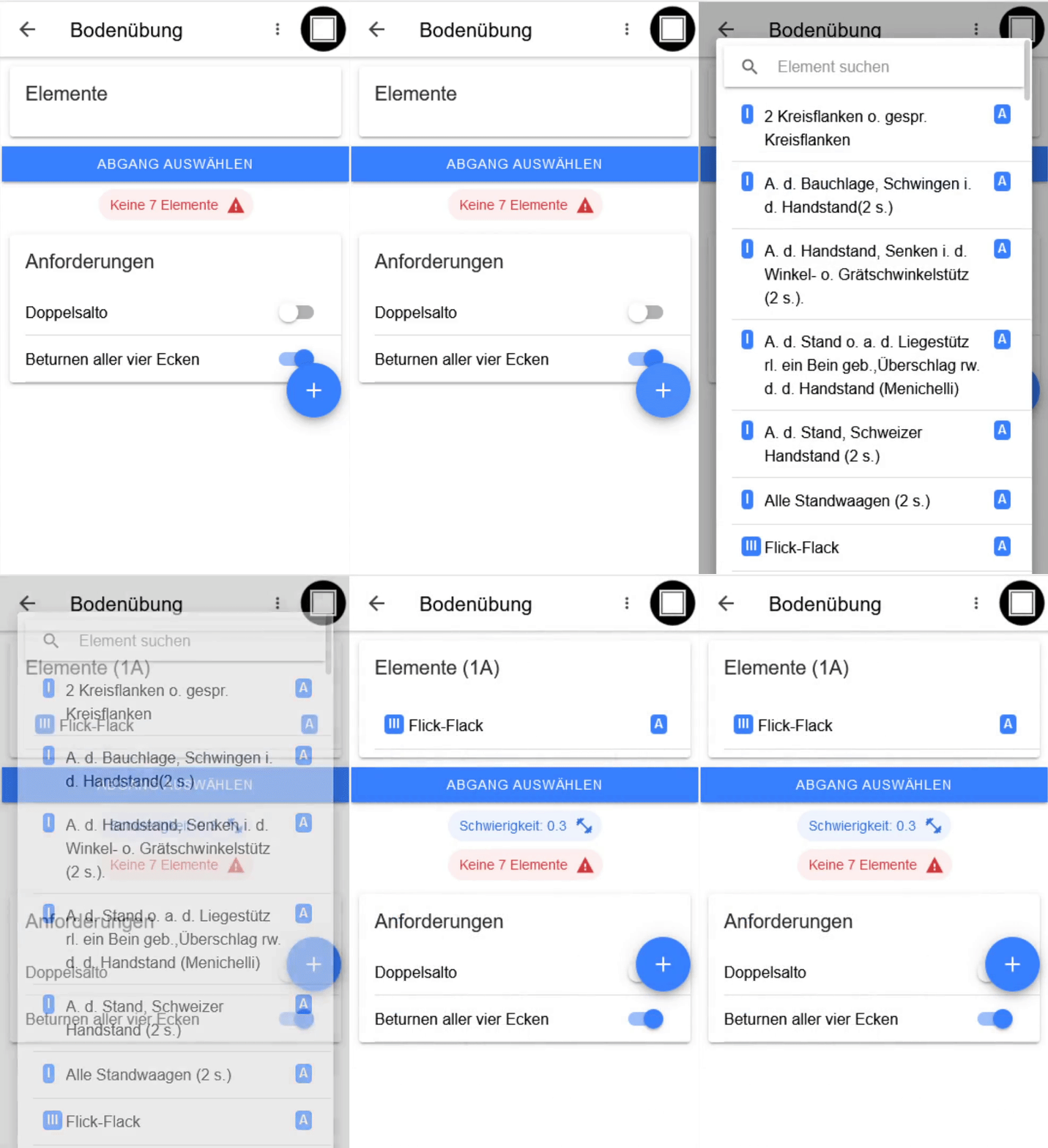
<p>Elemente können durch das Klicken auf das Plus-Icon und Auswahl des Elements hinzugefügt werden.</p>

<p><img src="https://raw.githubusercontent.com/timKraeuter/timKraeuter.github.io/master/assets/images/tutorial/add_de.gif" alt="Hinzufügen von Elementen" /></p>

<p>Ein Abgang kann über den Button “Abgang auswählen” hinzugefügt werden.</p>

<h2 id="element-löschen">Element löschen</h2>
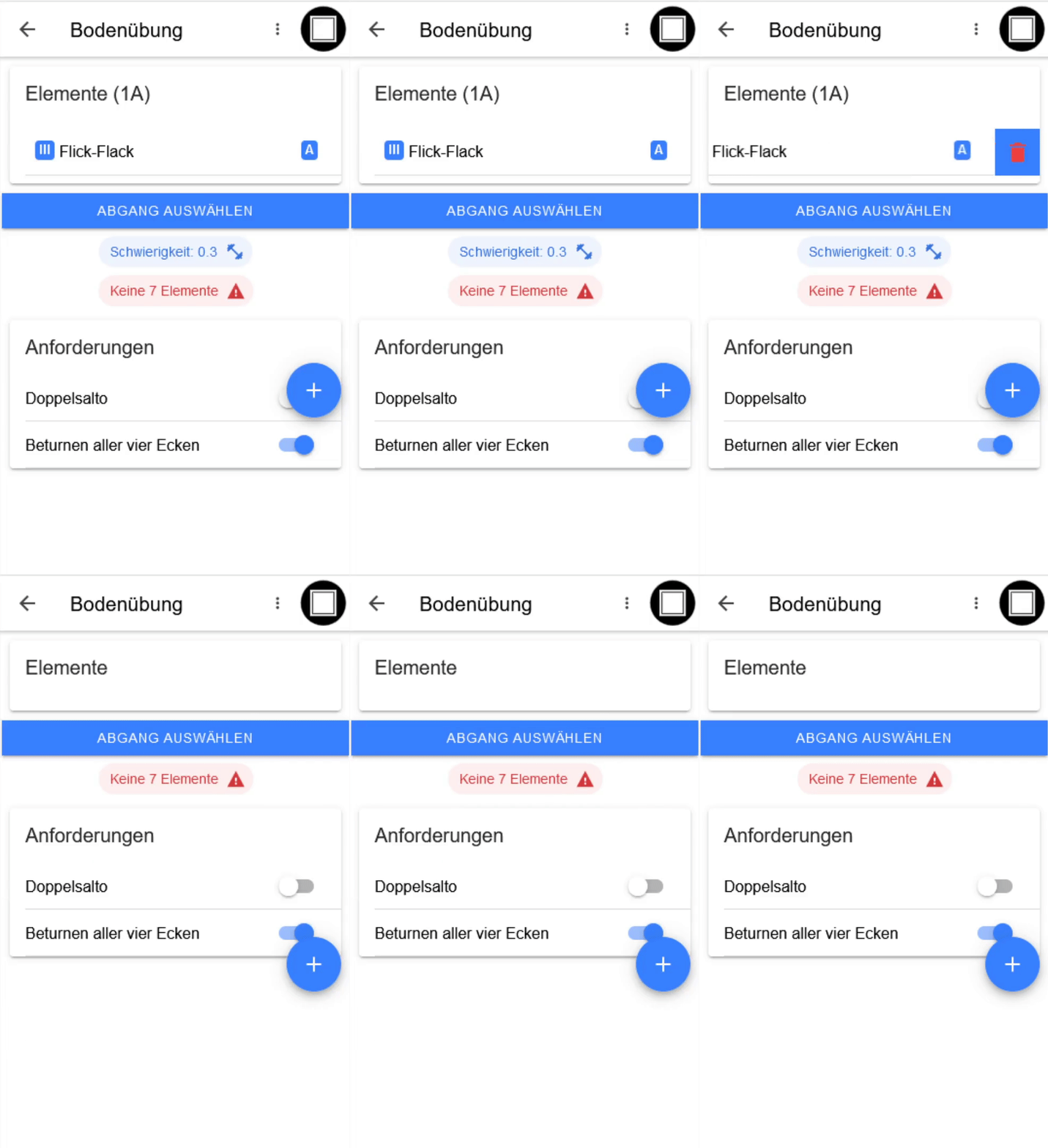
<p>Elemente können durch Swipe nach Links und einem Klick auf das auftauchende Lösch-Icon entfernt werden.</p>

<p><img src="https://raw.githubusercontent.com/timKraeuter/timKraeuter.github.io/master/assets/images/tutorial/delete_de.gif" alt="Löschen von Elementen" /></p>

<p>Ein Abgang kann wie ein Element entfernt werden.</p>

<h2 id="elemente-umsortieren">Elemente umsortieren</h2>
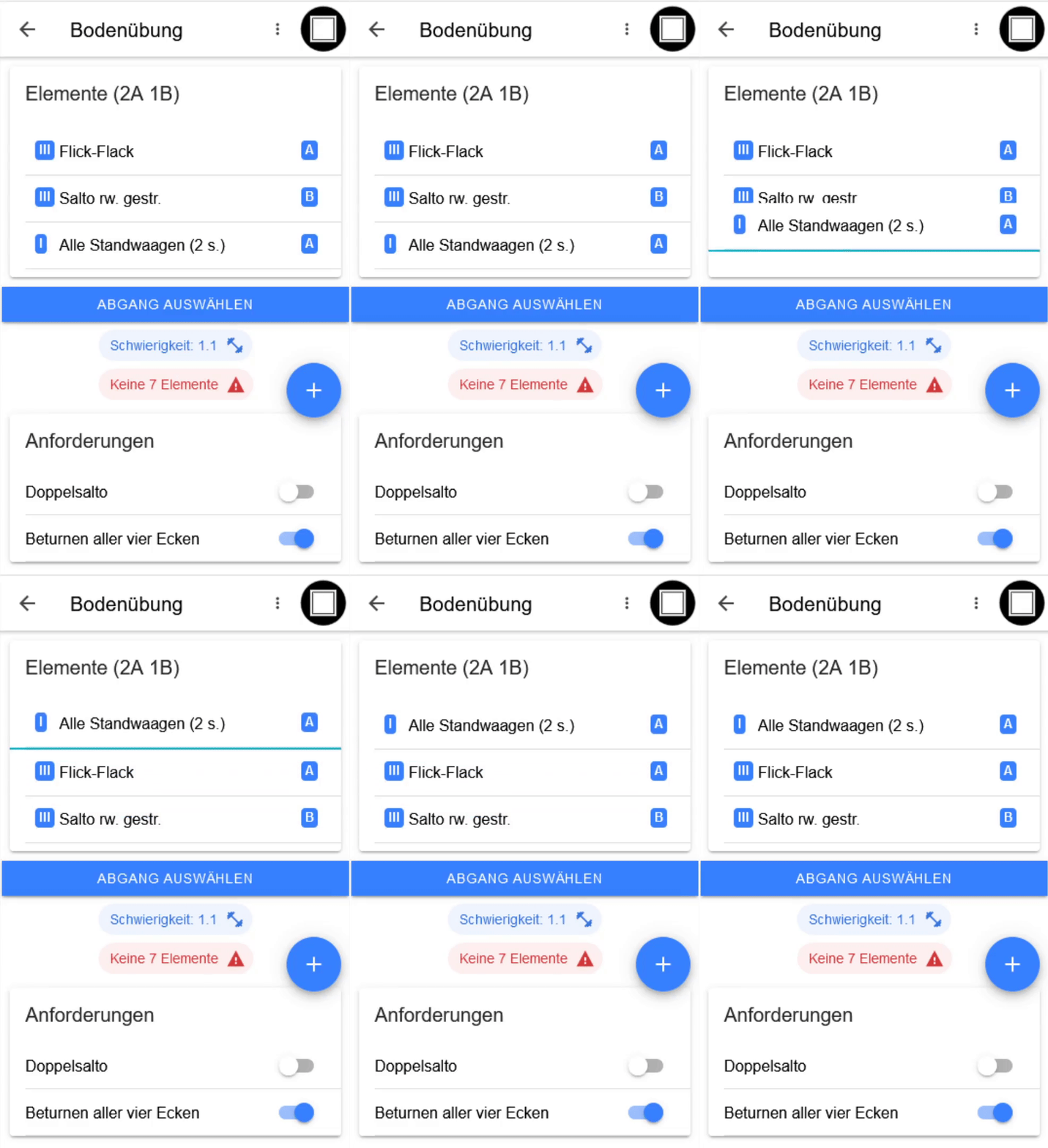
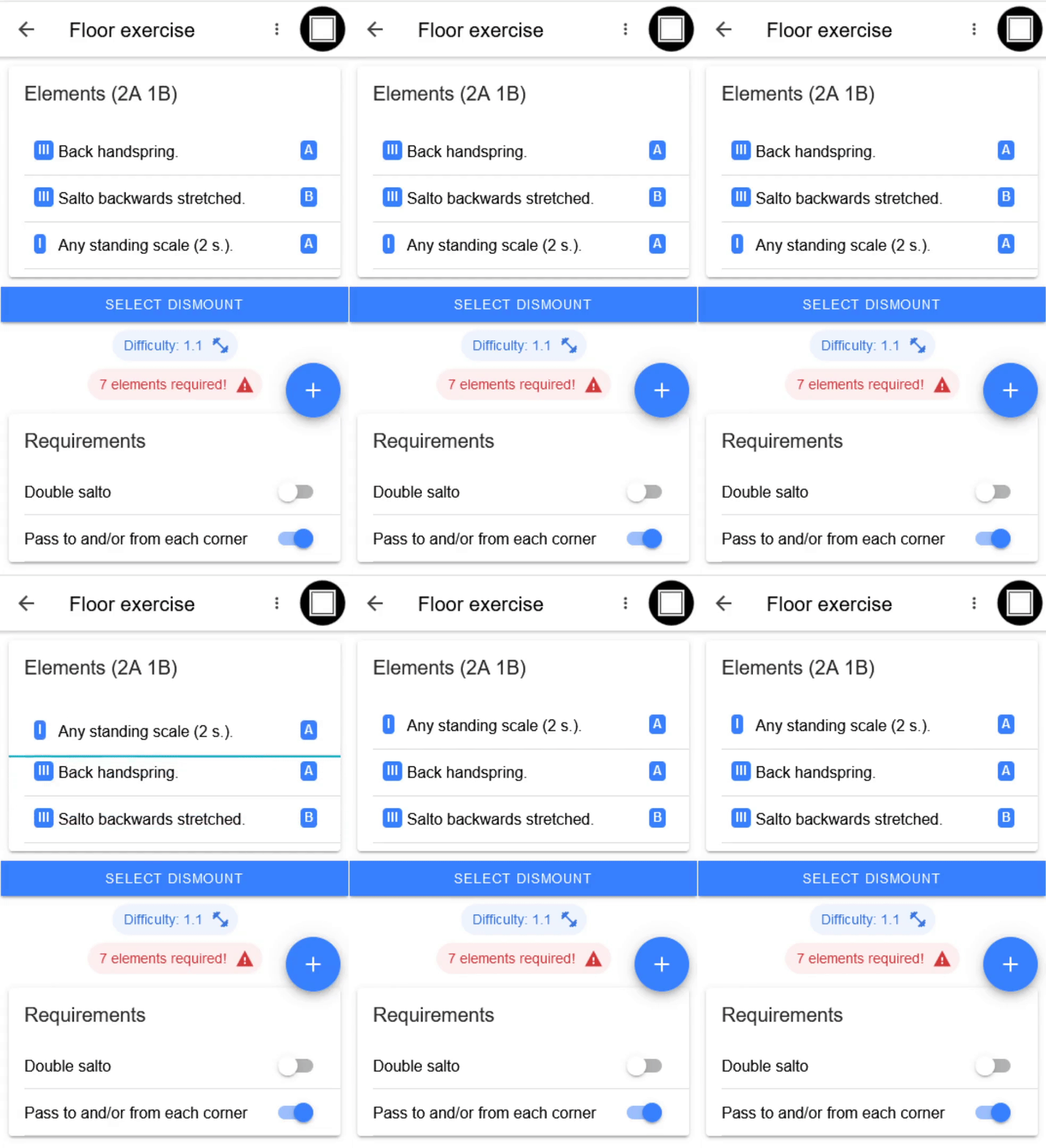
<p>Elemente können per Drag &amp; Drop umsortiert werden.</p>

<p><img src="https://raw.githubusercontent.com/timKraeuter/timKraeuter.github.io/master/assets/images/tutorial/sort_de.gif" alt="Drag &amp; Drop von Elementen" /></p>

<h1 id="exportimport-von-übungen">Export/Import von Übungen</h1>
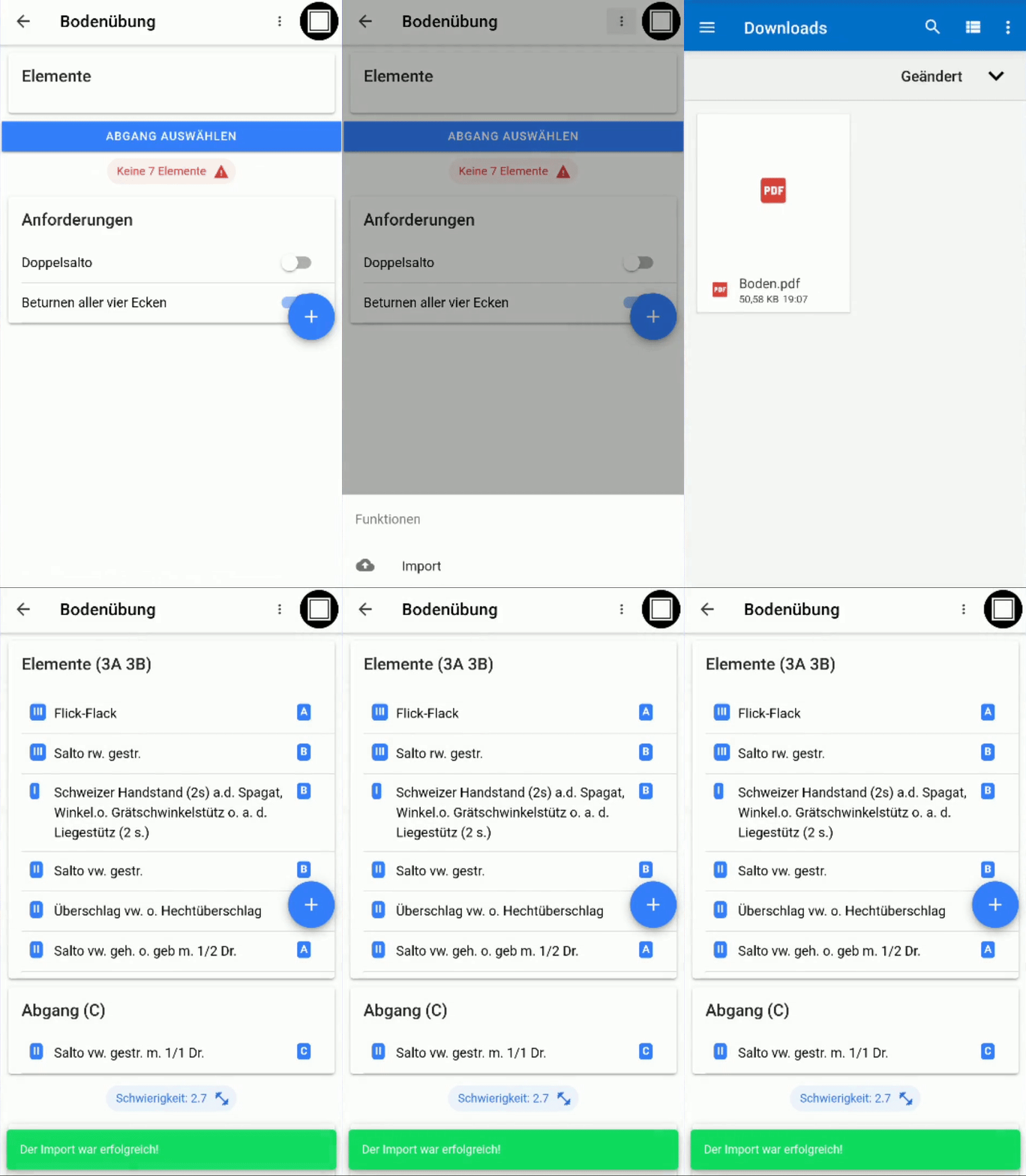
<p>Übungen können über die Drei-Punkte neben dem Icon des aktuellen Geräts exportiert und importiert werden.</p>

<h2 id="export">Export</h2>
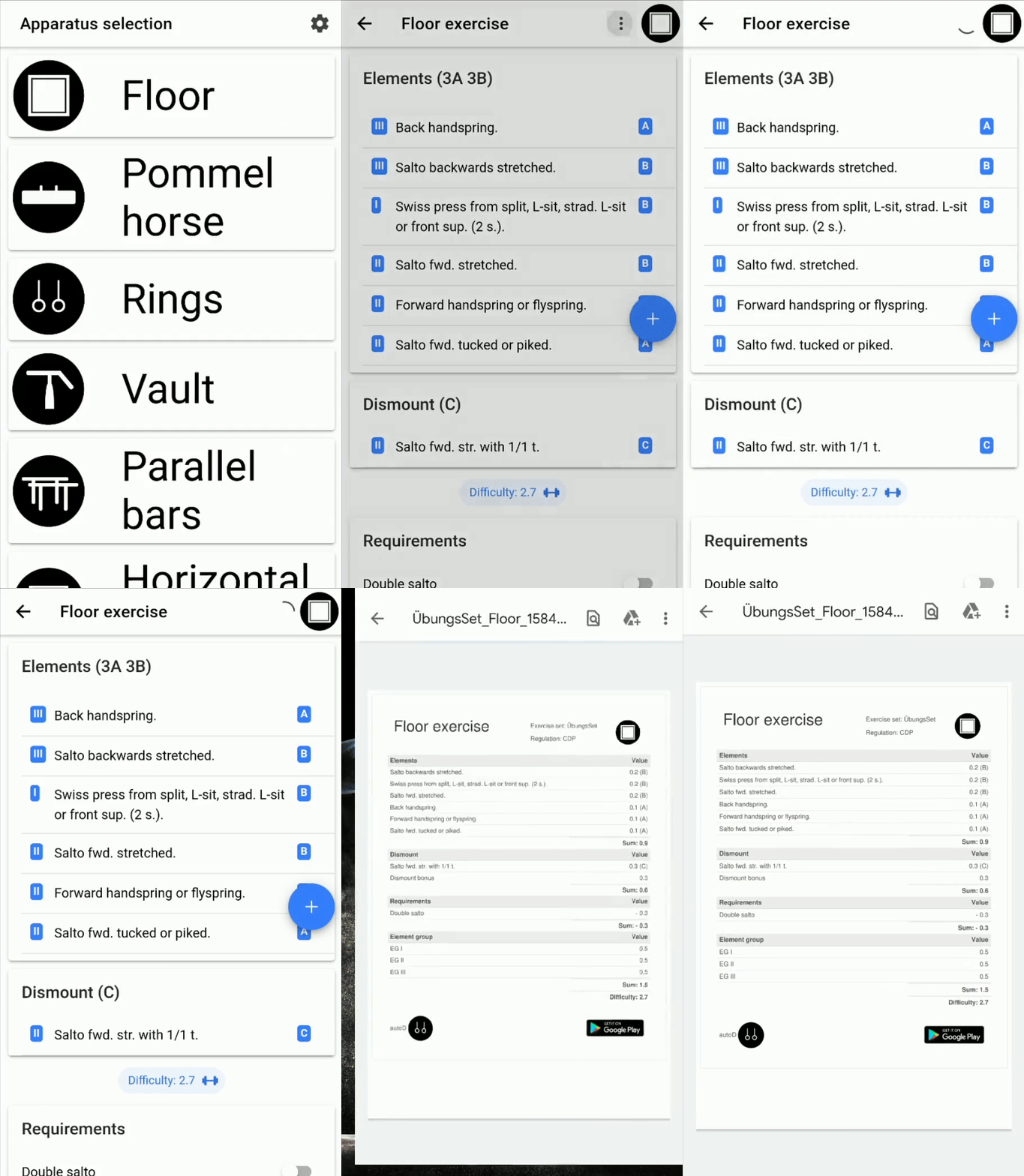
<p>Der Export einer Übung erzeugt eine PDF-Datei, welche die Berechnung detailliert wiedergibt.
<img src="https://raw.githubusercontent.com/timKraeuter/timKraeuter.github.io/master/assets/images/tutorial/export_de.gif" alt="Import einer Übung" /></p>

<h2 id="import">Import</h2>
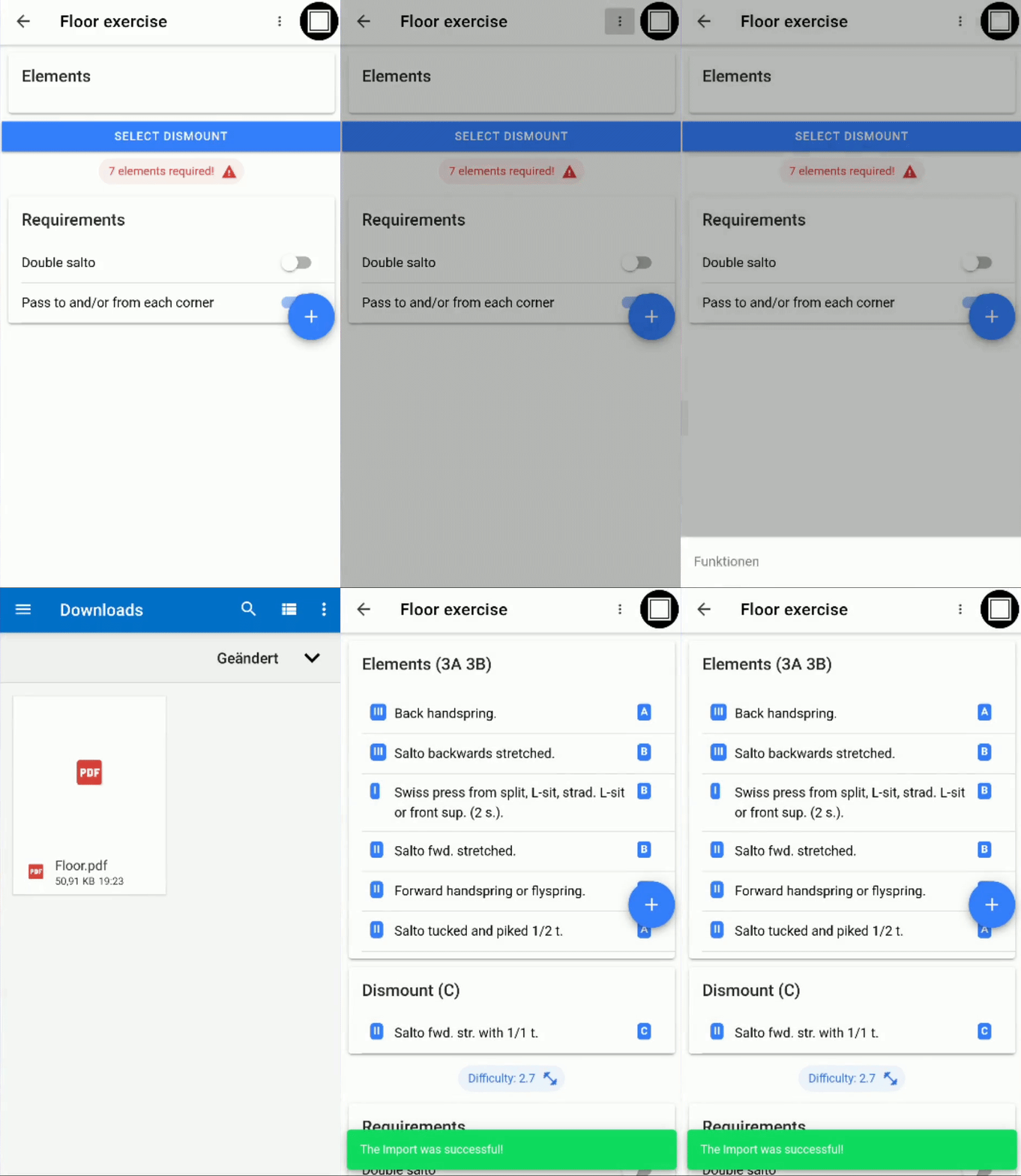
<p>Exportierte Übungen können auf andere Geräte übertragen und dort in die App importiert werden, um bspw. Änderungen vorzunehmen.</p>

<p><img src="https://raw.githubusercontent.com/timKraeuter/timKraeuter.github.io/master/assets/images/tutorial/import_de.gif" alt="Import einer Übung" /></p>

<hr />

<div style="display:flex;width:100%;align-items:center;;margin-top:-18%;">
    <div style="flex:49.99%;padding:5px">
    <a href="https://play.google.com/store/apps/details?id=de.tk.autoD&amp;pcampaignid=pcampaignidMKT-Other-global-all-co-prtnr-py-PartBadge-Mar2515-1"><img alt="Get it on Google Play" src="https://raw.githubusercontent.com/timKraeuter/timKraeuter.github.io/master/assets/images/g-play.svg" /></a>
    </div>
    <div style="flex:49.99%;padding:5px">
    <a href="https://smartcoppwa.web.app"><img alt="Launch as Web App" src="https://raw.githubusercontent.com/timKraeuter/timKraeuter.github.io/master/assets/images/PWA-dark-en.svg" /></a>
    </div>
</div>]]></content><author><name>timKraeuter</name></author><category term="blog" /><category term="app" /><category term="gymnastics" /><category term="tutorial" /><summary type="html"><![CDATA[Smart CoP: Kurzeinführung]]></summary><media:thumbnail xmlns:media="http://search.yahoo.com/mrss/" url="https://raw.githubusercontent.com/timKraeuter/timKraeuter.github.io/master/assets/images/autoD_icon_dark.png" /><media:content medium="image" url="https://raw.githubusercontent.com/timKraeuter/timKraeuter.github.io/master/assets/images/autoD_icon_dark.png" xmlns:media="http://search.yahoo.com/mrss/" /></entry><entry><title type="html">Smart CoP: Quick Tutorial :muscle:</title><link href="https://timkraeuter.com/SmartCoP-tutorial-en/" rel="alternate" type="text/html" title="Smart CoP: Quick Tutorial :muscle:" /><published>2020-02-24T19:33:00+00:00</published><updated>2020-02-24T19:33:00+00:00</updated><id>https://timkraeuter.com/SmartCoP-tutorial-en</id><content type="html" xml:base="https://timkraeuter.com/SmartCoP-tutorial-en/"><![CDATA[<h1 id="creating-an-exercise">Creating an exercise</h1>
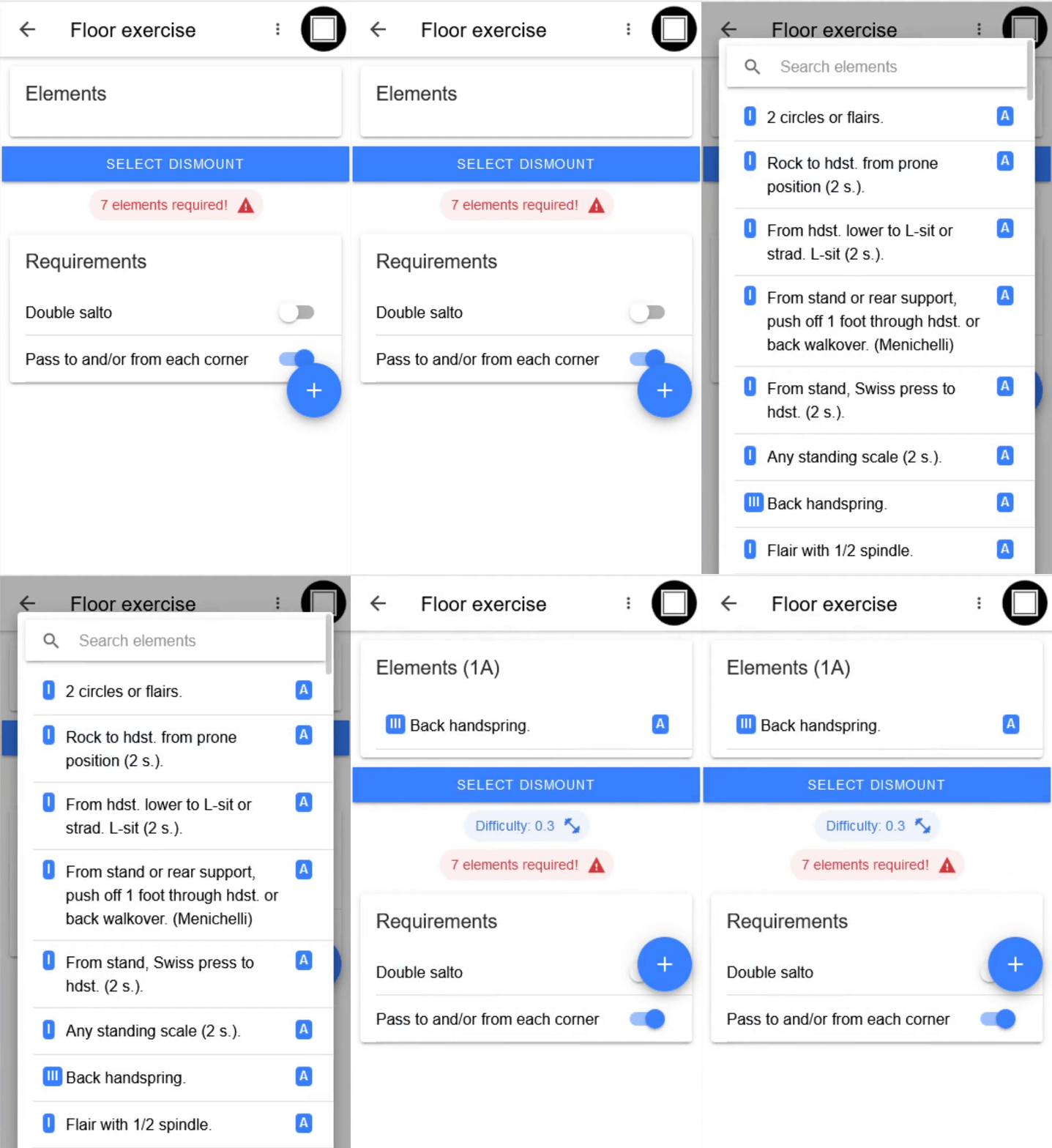
<p>To calculate the difficulty of an exercise, all elements must be added. Also, the fulfilled requirements can be selected.</p>
<h2 id="adding-elements">Adding elements</h2>
<p>Elements can be added by clicking the plus icon and selecting the element.</p>

<p><img src="https://raw.githubusercontent.com/timKraeuter/timKraeuter.github.io/master/assets/images/tutorial/add_en.gif" alt="Element addition" /></p>

<p>A dismount can be added using the “Select dismount” button..</p>

<h2 id="deleting-elements">Deleting elements</h2>
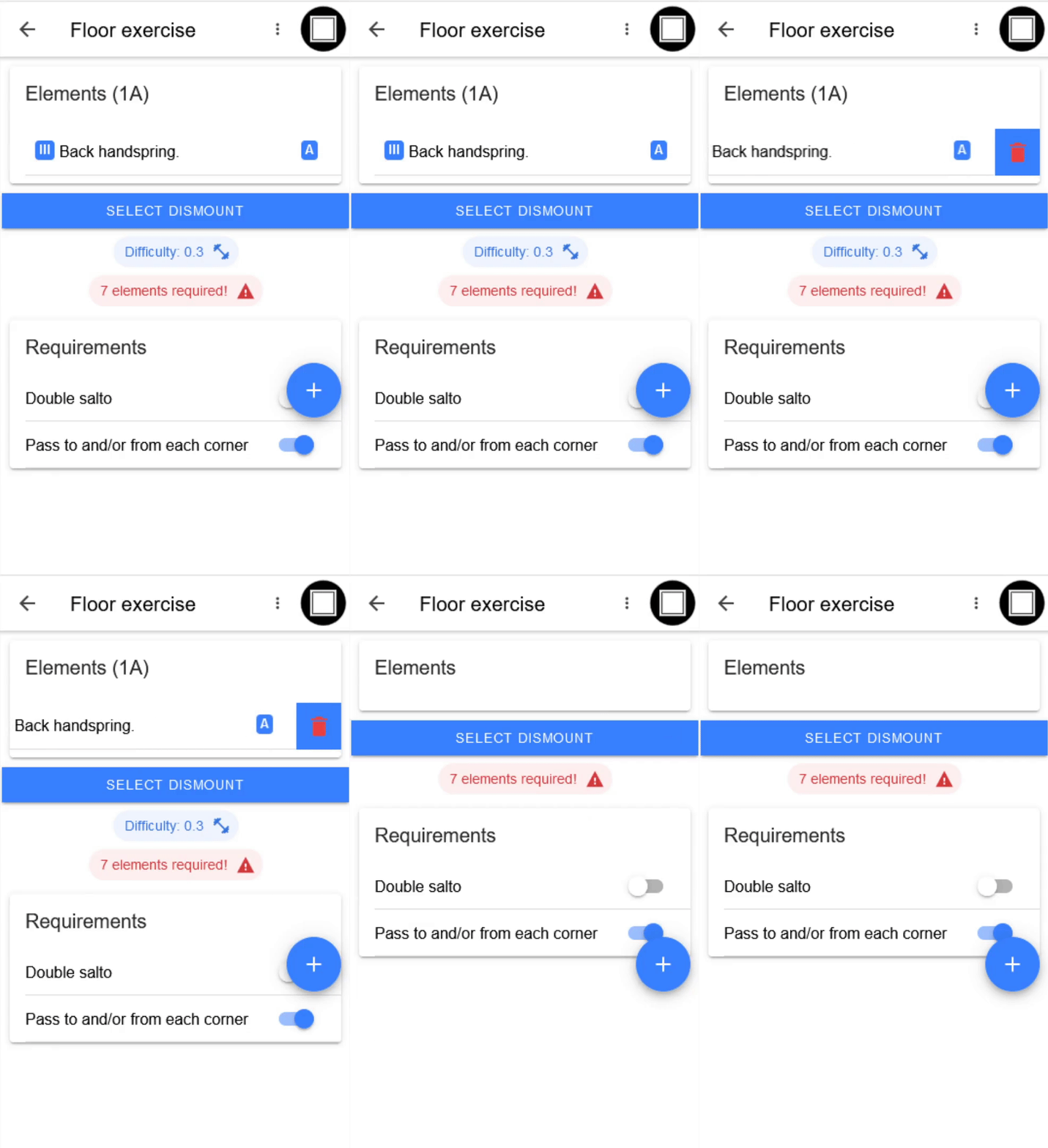
<p>Elements can be removed by swiping to the left and clicking on the delete icon that appears.</p>

<p><img src="https://raw.githubusercontent.com/timKraeuter/timKraeuter.github.io/master/assets/images/tutorial/delete_en.gif" alt="Element deletion" /></p>

<p>A dismount can be removed like an element.</p>

<h2 id="rearranging-elements">Rearranging elements</h2>
<p>Elements can be rearranged  using drag &amp; drop.</p>

<p><img src="https://raw.githubusercontent.com/timKraeuter/timKraeuter.github.io/master/assets/images/tutorial/sort_en.gif" alt="Element rearrangement" /></p>

<h1 id="exportimport-of-exercises">Export/Import of exercises</h1>
<p>Exercises can be exported and imported using the three dots next to the icon of the current device.</p>
<h2 id="export">Export</h2>
<p>The export of an exercise creates a PDF file that shows the calculation in detail.
<img src="https://raw.githubusercontent.com/timKraeuter/timKraeuter.github.io/master/assets/images/tutorial/export_en.gif" alt="Import einer Übung" /></p>

<h2 id="import">Import</h2>
<p>Exported exercises can be transferred to other devices and imported into the app, for example, to make changes.</p>

<p><img src="https://raw.githubusercontent.com/timKraeuter/timKraeuter.github.io/master/assets/images/tutorial/import_en.gif" alt="Import of an exercise" /></p>

<hr />

<div style="display:flex;width:100%;align-items:center;;margin-top:-18%;">
    <div style="flex:49.99%;padding:5px">
    <a href="https://play.google.com/store/apps/details?id=de.tk.autoD&amp;pcampaignid=pcampaignidMKT-Other-global-all-co-prtnr-py-PartBadge-Mar2515-1"><img alt="Get it on Google Play" src="https://raw.githubusercontent.com/timKraeuter/timKraeuter.github.io/master/assets/images/g-play.svg" /></a>
    </div>
    <div style="flex:49.99%;padding:5px">
    <a href="https://smartcoppwa.web.app"><img alt="Launch as Web App" src="https://raw.githubusercontent.com/timKraeuter/timKraeuter.github.io/master/assets/images/PWA-dark-en.svg" /></a>
    </div>
</div>]]></content><author><name>timKraeuter</name></author><category term="blog" /><category term="app" /><category term="gymnastics" /><category term="tutorial" /><summary type="html"><![CDATA[Smart CoP: Quick Tutorial]]></summary><media:thumbnail xmlns:media="http://search.yahoo.com/mrss/" url="https://raw.githubusercontent.com/timKraeuter/timKraeuter.github.io/master/assets/images/autoD_icon_dark.png" /><media:content medium="image" url="https://raw.githubusercontent.com/timKraeuter/timKraeuter.github.io/master/assets/images/autoD_icon_dark.png" xmlns:media="http://search.yahoo.com/mrss/" /></entry><entry><title type="html">Smart CoP: calculate your gymnastics difficulty :muscle:</title><link href="https://timkraeuter.com/SmartCoP-app/" rel="alternate" type="text/html" title="Smart CoP: calculate your gymnastics difficulty :muscle:" /><published>2020-01-19T15:10:00+00:00</published><updated>2020-01-19T15:10:00+00:00</updated><id>https://timkraeuter.com/SmartCoP-app</id><content type="html" xml:base="https://timkraeuter.com/SmartCoP-app/"><![CDATA[<p>Since no gymnast from my club, including me, knew how to calculate his difficulty score, I made an app that does it for you.</p>

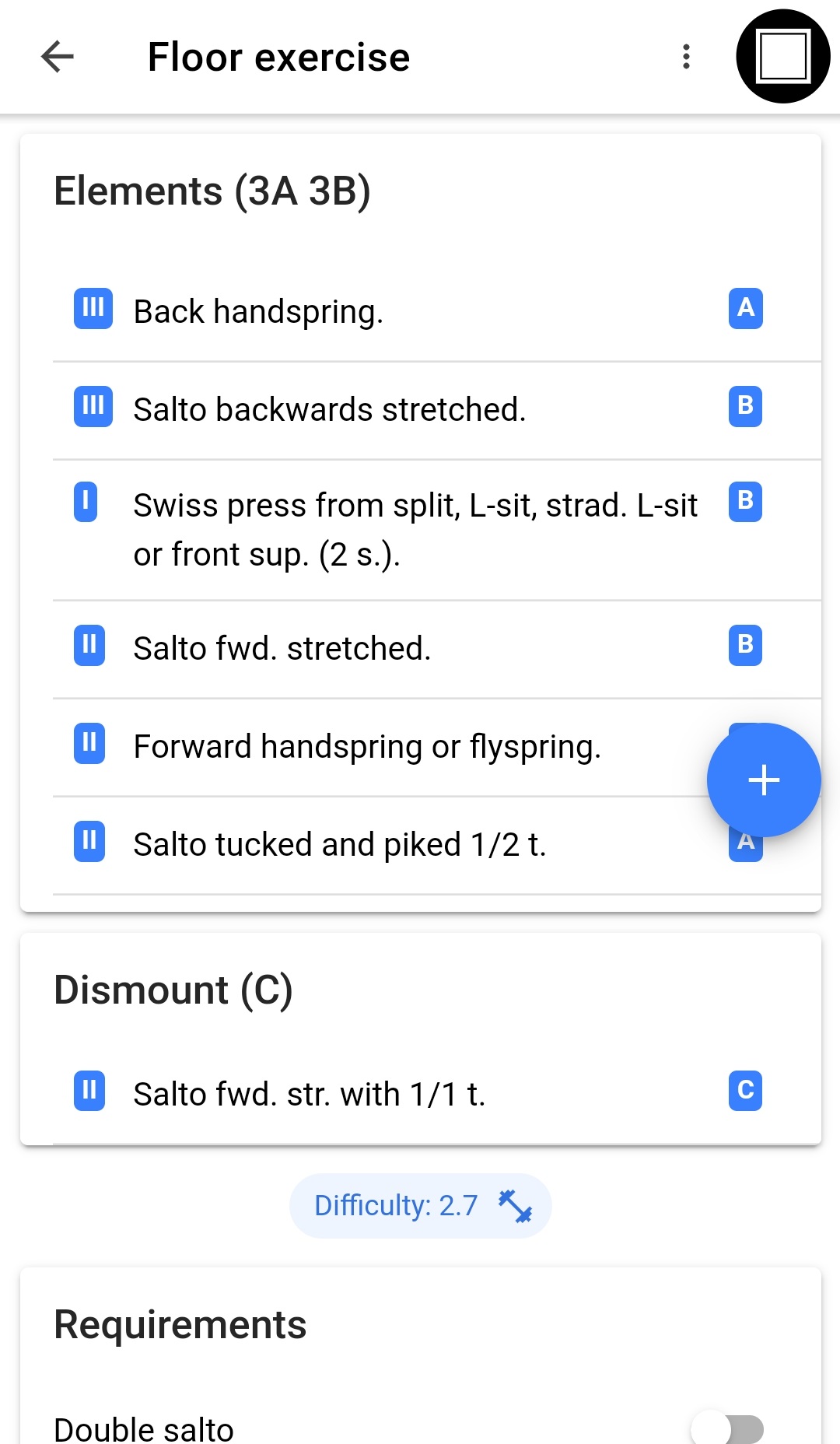
<p>Example of the app - Smart CoP - calculating the difficulty of a floor exercise.</p>

<p><img src="https://raw.githubusercontent.com/timKraeuter/timKraeuter.github.io/master/assets/images/screenshot.jpg" alt="Screenshot" /></p>

<p>It is an app to calculate your gymnastics difficulty. You select the elements of your exercise and the app automatically calculates the difficulty score.</p>

<hr />

<p>What can it do?</p>

<ul>
  <li>Calculate your difficulty by providing all elements from the code of points.</li>
  <li>Saves your exercises in the app automatically.</li>
  <li>Not cost you anything or annoy you with advertisements.</li>
  <li>Export your exercise to a beautiful pdf, as seen <a href="https://drive.google.com/open?id=1vzjhyJnCMgtyz4uOayX06g2zH5qw2dRP">here</a>.</li>
  <li>Import the created pdf files back into the app, so you can share and collaborate with your fellow gymnast friends.</li>
</ul>

<p>Have a look at my tutorial page in <a href="https://timkraeuter.github.io/SmartCoP-tutorial-en/">english</a> and <a href="https://timkraeuter.github.io/SmartCoP-tutorial-de/">german</a>.</p>

<hr />

<p>After 5 years and over 500+ downloads, I have unpublished the app.</p>

<p><img src="https://raw.githubusercontent.com/timKraeuter/timKraeuter.github.io/master/assets/images/smartCoP/playStore.png" alt="Overview of the App showing downloads" /></p>

<p>I am not competing in gymnastics at the moment and the app is not up to date anymore (since 2025) due to the new regulations.
If anyone wants to pick up the development of the app feel free to reach out to me.</p>

<p>The following graph shows the active installs of the app from 2020-2025, when the app was unpublished.
The app peaked at 148 concurrent installations as shown in the graph.
I only marketed the app once which resulted in an <a href="https://raw.githubusercontent.com/timKraeuter/timKraeuter.github.io/master/assets/images/smartCoP/LEON_article.pdf">article</a> in the german gymnastics magazin Leon.</p>

<p><img src="https://raw.githubusercontent.com/timKraeuter/timKraeuter.github.io/master/assets/images/smartCoP/installs.png" alt="History of the install base across the last 5 years." /></p>

<hr />]]></content><author><name>timKraeuter</name></author><category term="project" /><category term="app" /><category term="gymnast" /><summary type="html"><![CDATA[This is an app to calculate your gymnastics difficulty for all the gymnasts out there.]]></summary><media:thumbnail xmlns:media="http://search.yahoo.com/mrss/" url="https://raw.githubusercontent.com/timKraeuter/timKraeuter.github.io/master/assets/images/autoD_icon_dark.png" /><media:content medium="image" url="https://raw.githubusercontent.com/timKraeuter/timKraeuter.github.io/master/assets/images/autoD_icon_dark.png" xmlns:media="http://search.yahoo.com/mrss/" /></entry></feed>